

Healthy! Macros are revealed where there's someone to group with: assist combinations, spoilers, and kit changes at the Olympics are needed on a live server. If you're wondering where to start, check out l2 server announcements — you can see which projects are starting in the near future.
A macro is a chain of commands that a character executes with a single press: target, attack, use a skill, equip an item, or chat. Everything is configured in-game; no third-party programs are required.
Below are the exact limitations from the server code, a full breakdown of the commands with a note indicating whether they are processed by the client or the server, ready-made examples, and an analysis of why macros break.
Limitations: What the server checks
These numbers are not build-specific—they are hardcoded into the macro creation package:
| What | Limit | Clarification |
|---|---|---|
| Macros per character | 48 | When trying to create the 49th, a system message about failure appears |
| Lines in a macro | 12 | The server silently discards extra lines |
| Name | 12 | input field limitation; the package itself accepts up to 32 |
| Description | 32 | checked by the server, if exceeded the macro will not be created |
| Acronim | 4 | what is visible on the icon; excess is cut off |
| The symbols ";" and "," | are cut out | the server removes them from each line without warning |
The "Description" field is often forgotten: it is separate from the name, and it is because of it that the macro sometimes "does not save" without a clear reason.
The creation panel is opened by pressing the shortcut ALT+R Or through the settings - "Macro." The available number is shown in the upper right corner of the window.

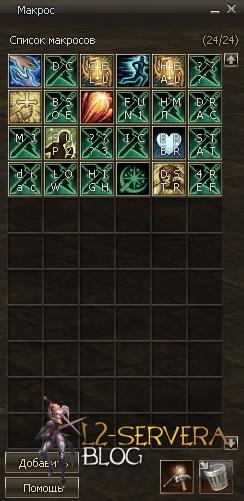
The "Add" button creates a new macro. The acronym is the same four characters that appear directly on the icon:

You can select an icon from a color set using the magnifying glass button:
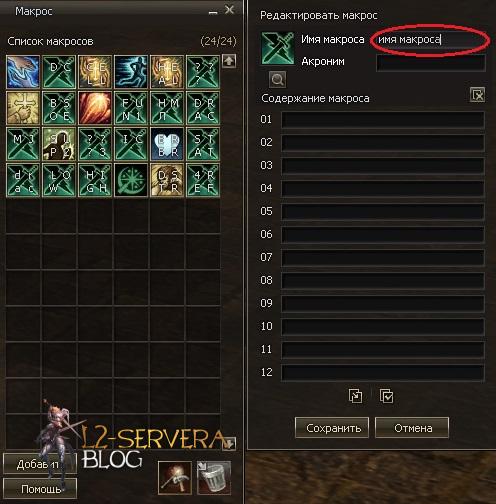
Editing and deleting are two buttons in the lower right corner:

Client or Server - Why Does It Matter?
The commands in the macro are divided into two unequal groups, and this explains most of the discrepancies between projects.
Customer — the game client itself parses them. It turns the command into a standard action: press a skill, take a target, wait. The server knows nothing about the command itself; it only receives the result. Such commands work the same everywhere because they depend only on the client.
Серверные — the client sends them by number, and the server makes the decision. That's where they differ: some can be disabled, others behave differently.
A good example is - /delayThis is a purely client-side pause; there's no such command on the server. Therefore, the delay isn't guaranteed: if the skill hasn't had time to recharge, the macro will simply continue.
Action commands
The main set that makes up the body of the macro:
| Our team | What is he doing | Where |
|---|---|---|
| / target Nick | target a character by name | client |
| /target %party1 ... %party8 | target a group member by number | client |
| %self | direct the action towards oneself | client |
| %pet | direct the action to the pet | client |
| %target | substitute the current target | client |
| /assist | take the target of the one you have chosen | client |
| /attack | start hitting the selected target | client |
| /useskill name | apply the skill | client |
| /useskillforce name | the same, but forced - as with Ctrl pressed | client |
| /useshortcut page cell | click a specific cell on the quick access toolbar | client |
| /useshortcutforce page cell | the same forced | client |
| /delay seconds | pause between lines | client |
| /friendinvite Nick | invite as a friend | server |
| /frienddel Nick | убрать из друзей | server |
| /friendlist | Friend list | server |
| /block Nick | add to ignore list | server |
| /unblock Nick | remove from ignore list | server |
| /blocklist | open ignore list | server |
| /allblock | block all communication altogether | server |
| /allunblock | remove the complete block | server |
| /clanwarstart clan | declare war on the clan | server |
| /clanwarstop clan | propose to end the war | server |
Difference between /useskill и /useskillforce Practical: The normal form won't work on targets the game doesn't consider hostile—friendly players, neutral NPCs, or players without a flag. The forced form replaces holding down Ctrl.


Three teams that are described incorrectly
/evaluate - Is issuing a recommendation to the selected target, not a reset of recommendations. It works from level 10, but only for another player (you can't do the same thing twice), and the number of recommendations per period is limited.
The three lists of wars are different. They are constantly confused, although in the game these are three independent lists:
| Our team | What does it show? |
|---|---|
| /attacklist | clans that declared war on you |
| /underattacklist | clans that declared war you |
| /warlist | mutual wars - those who are on both lists at once |
/ nick - he can change his title only nobles, and only by indicating your own name. Everyone else gets the title from the clan leader, and it only works within the clan. Level 3 or higher.
Service commands that aren't usually written about
They are processed by the server, and all of them can be easily placed into a macro:
| Our team | What is he doing |
|---|---|
| /loc | shows your coordinates |
| / time | game time of day |
| /partyinfo | group composition and rules for dividing the spoils |
| /unstuck | get out if the character is stuck in textures |
| /siegestatus | the state of affairs at the siege in which you are participating |
| /clanpenalty | Current clan fines |
| /olympiadstat | your statistics at the Olympics |
| /instancezone | Which dungeons are subject to entry rollbacks? |
| Command Channel Commands | information about the channel, the composition of its participants, leaving the channel and its dissolution |
Commands through a dot
A separate layer is for commands that begin with a dot: .online, .ping, .whoami, .cfg, .relog, .offline, .deposit and the like. Technically, these aren't commands, but rather a regular chat message—the server intercepts it and performs the action.
Two things follow from this. Firstly, such commands work from a macro a simple text string. Secondly, their set depends entirely on the project: they are server add-ons, not part of the game, and the list varies from project to project, sometimes even being completely absent.
Chat from a macro
A line starting with a channel sign is sent to the chat. This is the simplest type of macro—for example, a one-click sales announcement:
| Sign | Channel | Who will see? |
|---|---|---|
| ! | Scream | everything within the city or territory |
| @ | Clan | clan members only |
| $ | Alliance | alliance members only |
| # | Group | only your group |
| + | Trade | players nearby, in pink |
| % | Heroic | the whole world is accessible only to Olympic heroes |
| " | Personal | you and your interlocutor |
There are more than seven channels in the game: there is also a team channel chat (general and separate for commanders), a group search room chat, a friends chat, and a battle channel. But the "world chat" is through & — is not part of Interlude, but an add-on for individual projects, so it doesn’t work everywhere.

Quick Access Toolbar and Main Trap
Our team /useshortcut takes two numbers: the panel page and the cell number. Pages twenty (zero through nineteen), each with twelve slots. Each slot can hold an item, skill, action, recipe, teleportation bookmark—and even the macro itself.
Now about the trap that most often causes macros to break. Macros are stored on the character as a whole, and the panel is separate for each profession. The main class and each subclass have their own cell layout, but the list of macros is the same for all.
Hence the consequence: a macro compiled on the main class through /useshortcut, after changing to the subclass will click completely different buttons — those that reside in the same cells of the subclass. The macro appears intact, produces no errors, and simply does something wrong. If the macro needs to work for multiple professions, the cell layout will have to be repeated manually for each.
Why does the macro break?
Any action you take interrupts execution. Stepping aside, turning on the charger, opening a window, or sending a chat message—the macro stops at the current line. This isn't a bug, but by design: the macro shouldn't work without player input.
A macro cannot be nested within a macro. A line with a reference to another macro simply will not be executed.
Dragging things between cells breaks the finished macro. It remembers the cell number, not what's in it. Two things were swapped, and the macro started doing something else.
Commas and semicolons disappear. The server strips them from each line, so the ad text will have to be written without them.
Examples: farming by assist
The most popular macro is to hit the same thing as your partner:
/target %party1— we take the first one in the group as a target/assist- we switch to his target/attack— we attack/attack- the second line in case the first one didn't work
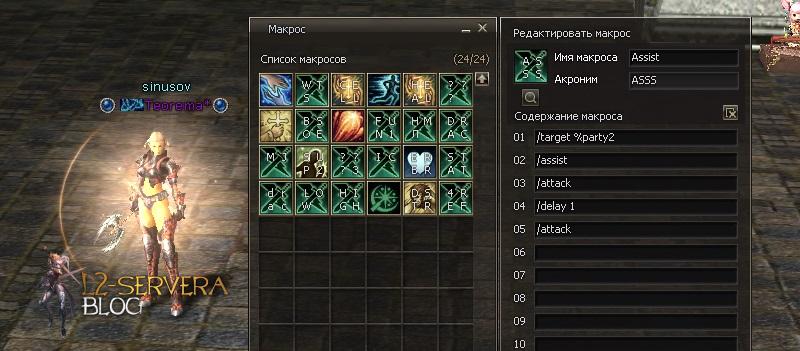
For the spoiler, the skill itself and the pause before collection are added:
/target %party2— the goal of the second in the group/assist/useskill Spoil/delay 3— we're waiting for the monster to be finished off/useskill Sweeper
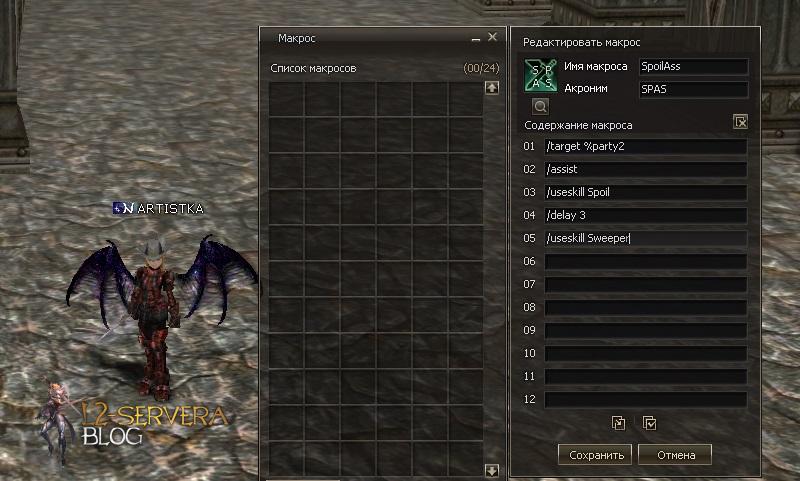
The delay is selected for your group: the pause is client-side, the server does not control it, and if the value is too short, the collection will last until the monster dies.
Examples: Olympics
Change the kit with one button. First, all the parts are placed on the panel, each in its own cell:

Then each part is dragged from the panel into a separate line of the macro:

The finished macro is placed on the panel like a regular skill and works with one click:
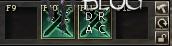
Once the macro is assembled, the items in the cells cannot be touched: the cell numbers are remembered, and any rearrangement will result in the outfit not being put on completely.
Weapon buffs. The principle is the same: a weapon with the required properties is placed on the panel.

The weapon is moved to the macro line, then equipped, and the buff itself is moved from the list of active skills to the next line. Each weapon must be followed by its skill:

Fascia Massage:
- 48 macros per character, 12 lines each.
- Name up to 12 characters, description up to 32, acronym up to 4.
- Commas and semicolons are automatically removed from lines.
- /delay — client pause, the server does not control it.
- /useskillforce is needed where the regular /useskill does not see the target as an enemy.
- There are 20 panels with 12 cells each; items, skills, recipes, and macros are placed on them.
- Macros are common to all professions, but the panel layout is specific to each.
- Any action by the player interrupts the execution of the macro.
- /evaluate gives a recommendation rather than resetting it.
- Three lists of wars show different things: who you declared war on, who declared war on you, mutual.
Read more:
You can support the project by subscribing to our Telegram Channel, in which we regularly hold giveaways for our subscribers.


Comments
There are no comments yet. Be the first!
leave a comment