

Reference!
Command Channel (CC) is a mechanic for uniting multiple groups (parties) into one large raid squad. It is used to kill epic bosses, complete raids, sieges, and coordinate mass battles.
Command Channel in Lineage 2:
Developing your clan and creating an alliance, sooner or later you will face a situation where one group (party) is no longer enough for a battle. You will need to unite several groups to coordinate actions in PvP, sieges or during raid battles. This is what the Command Channel in Lineage 2 is for.
Healthy!
The Command Channel in Lineage 2 is a key mechanic for organizing mass battles, allowing several groups to unite into a single coordinated raid for farming epics, sieges, and large-scale PvP battles. Without it, it's impossible to effectively manage a large number of players: the leader coordinates actions, assigns roles, and issues commands to all participants at once, which is critical in large-scale battles. It's through the Command Channel that true team gameplay and clan interaction are realized. But for this system to work as intended and ensure real competition for content, it's important to choose the right project from the start, so it's worth checking out the latest version before starting. л2 анонс, where there is live online and active mass battles.
How to create a command channel in Lineage 2?
Requirements:
- The Party Leader must be in a clan of level 5 or higher.
- The minimum number of people in one group is 2 players.
- The minimum number of groups for a command channel is 2.
- The clan must have a strong skill
 Clan Imperium.
 - If for some reason the skill Clan Imperium if you haven't been taught, then you can buy
 strategy guide for such NPCs:
- Trader Holly -> Town of Aden, Trader Weber -> Rune Township, Trader Skin -> Town of Schuttgart.
Commands for creating CC:
- /channelinvite [player nickname] – invite the leader of another group.
- /channel delete - Dissolve the command channel.
- /channelkick [player nickname] - kick a group from a command channel
- /channelleave — exit the command channel
Once created, the Command Channel Leader can invite other group leaders, thus uniting them into a single unit. If the group the channel leader is a part of disbands – the channel is automatically closed.
If the leader of the command channel will leave the game (disconnect), the system will randomly transfer leadership to another player from his group, along with the rights to manage the command channel.
You can change the channel leader by changing the leader of your group, this can be done using the command /changepartyleader.
Command Channel in Lineage 2: Functions
In Lineage 2, the leader of the command channel (CC) can send messages to all raid members using special prefixes in the chat. This helps to effectively coordinate actions during battles, raids and sieges.
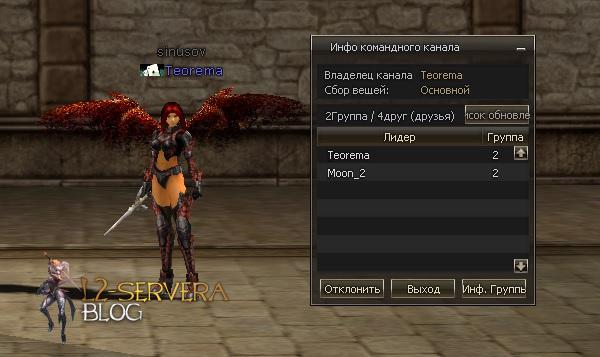
How to send messages in CC?
- ` (the button with the tilde sign ~ or the letter Ё in the Russian layout) - the message will be seen only by the leaders of the groups within the command channel (displayed in yellow). This is useful for discussing tactics and team decisions between captains.
- `` (two tildes in a row) - the message is sent to all members of the command channel (displayed in pink). Used when you need to convey important information to all raid members.
Example:
- ` We move towards the boss (only party leaders will see it).
- `` Attack now! (will be visible to all members of the command channel).
The command channel in Lineage 2 greatly simplifies communication in mass battles, allowing you to maintain order and quickly respond to the situation on the battlefield.
Where can I find l2 servers with an adequate community and stable economy? Here are the answers.
More useful information in our blog dedicated to Lineage 2.


Comments
There are no comments yet. Be the first!
leave a comment